Learning Linearity in Audio Autoencoders
Bernardo Torres1, Manuel Moussallam2, Gabriel Meseguer-Brocal2
1Telecom Paris ·
2Deezer Research
We make an audio autoencoder's latent space behave like a vector space — adding and scaling latents corresponds to mixing and changing volume in the audio domain.
🎧 TL/DR: Listen first
The clearest demonstration: we add four stem latents (vocals + drums + bass + other) and decode the sum. A linear decoder should reconstruct the mixture. Compare the same operation across models below Lin-CAE recovers the mix, while baselines produce noise.
Jump to: the Latent Addition row in the audio demos, and switch between Lin-CAE and the baselines (M2L, Stable Audio VAE).
Autoencoders are powerful tools for learning compressed representations of sound, but their internal "latent" spaces are typically complex and non-linear. While in some applications this might be by design to capture high-level representations, it is often desirable to have low-level control over audio manipulations directly in the latent space. For example, adding the representations of two sounds doesn't create the representation of their mixture.
We introduce Linear Consistency Autoencoders (Lin-CAE), a simple training method that induces linearity in the latent space of a high-compression consistency autoencoder. This is done through data augmentation, without changing the model's architecture or loss function. While we apply this method to consistency models, a type of autoencoder where the decoder is a generative diffusion model, the approach is general and can be applied to any autoencoder architecture.
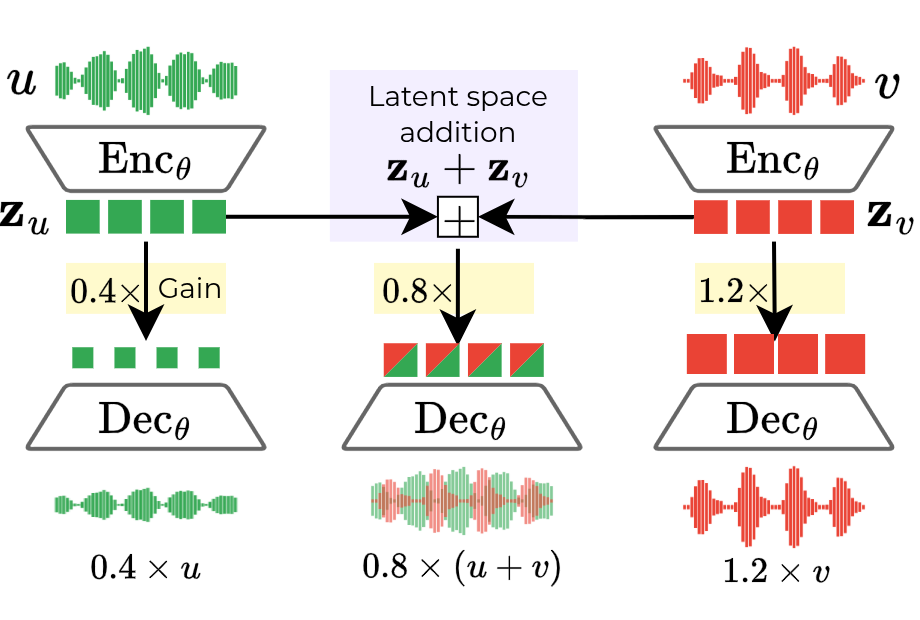
Properties of a linear autoencoder
A linear latent space allows for intuitive and efficient audio manipulation directly in the compressed representation. Let's denote the encoder as \(\operatorname{Enc}(\cdot)\) and the decoder as \(\operatorname{Dec}(\cdot)\), and a latent tensor as \(\mathbf{z}_x = \operatorname{Enc}(x)\) for an audio signal \(x\).
-
Homogeneity (Scaling): You can control the volume of a sound by simply multiplying its latent tensor by a scalar.
\(\operatorname{Dec}(\textcolor{magenta}{a} \cdot \mathbf{z}_x) \approx \textcolor{magenta}{a} \cdot \operatorname{Dec}(\mathbf{z}_x)\)
-
Additivity (Mixing): You can mix multiple sounds by adding their latents together.
\(\operatorname{Dec}(\mathbf{z}_u + \mathbf{z}_v) \approx \operatorname{Dec}(\mathbf{z}_u) + \operatorname{Dec}(\mathbf{z}_v)\)
Combining these properties unlocks some applications such as source separation via subtraction. By subtracting the latent of an accompaniment from the latent of a full mix, we can isolate any stem. For vocals, this can be expressed as: \(\operatorname{Dec}(\mathbf{z}_{\text{mix}} - \mathbf{z}_{\text{accomp}}) \approx \operatorname{Dec}(\mathbf{z}_{\text{vocals}})\)
Why this is useful
- Mix and edit audio inside the compressed space. No need to decode, edit, and re-encode: just add, subtract, and scale latents directly.
- Compositional generation. A generative model trained over Lin-CAE latents can sample stems independently and combine them additively into a coherent mixture.
- An alternative substrate for downstream models. Lin-CAE behaves like audio, but on a 64× compressed space. If you do audio processing in the latent space but don't want to deal with messy latents, Lin-CAE provides a structured starting point.
Audio Demos
The interactive players below compare our model (Lin-CAE) against a few baseline autoencoders on test samples from the MUSDB18-HQ dataset.
We recommend using headphones. Each row in the player performs a different operation in the latent space.
- Autoencoded Mix: The baseline reconstruction of the full mix.
- Latent Addition: We add the latent vectors of four stems (vocals, drums, bass, other) and decode the result.
- Original Vocals: The ground truth vocal stem, for reference.
- Separated Vocals: We subtract the latent vector of the accompaniment (drums, bass, other) from the latent vector of the full mix and decode the result.
- Latent Scaling: We multiply the vocal latent vector by a scalar and decode the result.
The following controls are available:
- Stop All: Stop all currently playing audio.
- Sync Playback: When enabled, switching between models or stems will sync the playback position across all audio elements. When disabled, each audio element will play from the beginning.
- Loop: When enabled, the audio will loop continuously.
Warning: Please turn your volume down before playing. The baseline models (M2L, Stable Audio VAE) can produce loud, unpleasant, and intense sounds when attempting linear operations they were not trained for.
Citation
If you use our work in your research, please cite our paper:
@misc{torres2025learninglinearityaudioconsistency,
      title={Learning Linearity in Audio Consistency Autoencoders via Implicit Regularization},
      author={Bernardo Torres and Manuel Moussallam and Gabriel Meseguer-Brocal},
      year={2025},
      eprint={2510.23530},
      archivePrefix={arXiv},
      primaryClass={cs.SD},
      url={https://arxiv.org/abs/2510.23530},
}